
Authentication proves who a user is, but authorization determines what that user can access. This article explores how broken access control emerges in modern web applications, how to validate it safely in an authorized lab, and how developers and penetration testers can identify, document, and reme
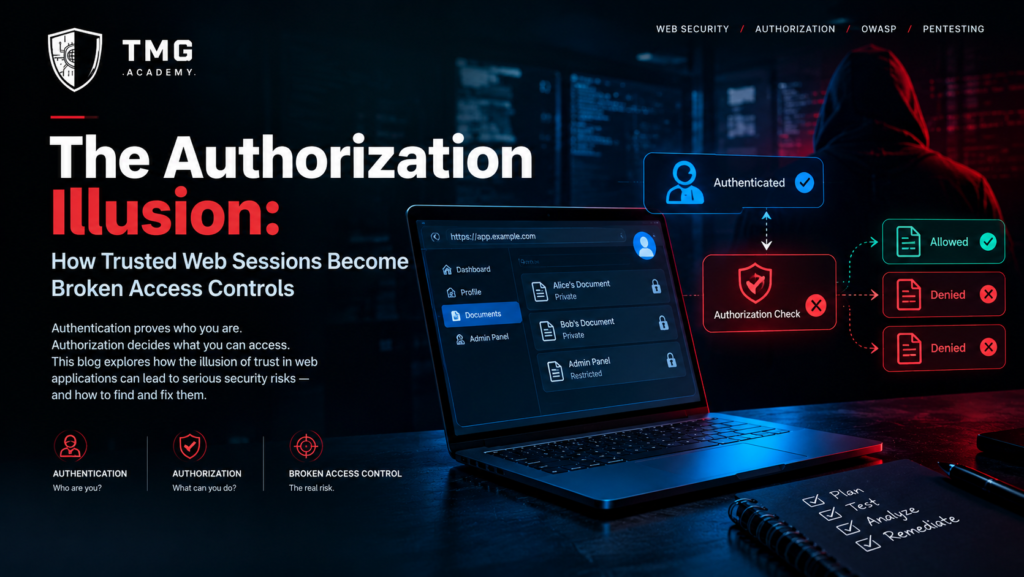
<h1>The Authorization Illusion: How Trusted Web Sessions Become Broken Access Controls</h1>
Category: Web Security
Focus: Broken Access Control, IDOR, API Security, Web Application Penetration Testing
Introduction: When a Valid Login Becomes a Security Risk
A user signs in to a web application using valid credentials. The server verifies the identity, creates a session, and allows the user to access the dashboard.
Everything appears to work correctly.
But authentication is only the first security decision.
Once inside the application, the user may interact with invoices, customer profiles, administrative functions, API endpoints, uploaded documents, and other resources. Every request involving a protected resource introduces another question:
Is this authenticated user actually authorized to perform this action on this specific resource?
If the application answers that question incorrectly, a valid session can become the starting point for unauthorized access.
This is the central problem behind broken access control, one of the major categories identified by the OWASP Top 10. It includes weaknesses such as insecure direct object references, missing function-level authorization, and privilege escalation caused by inadequate server-side enforcement.
The important lesson is that a successful login does not establish unrestricted trust.
A secure application must make authorization decisions continuously, according to the user's identity, permissions, requested action, and the specific resource involved.
1. Authentication Is Not Authorization
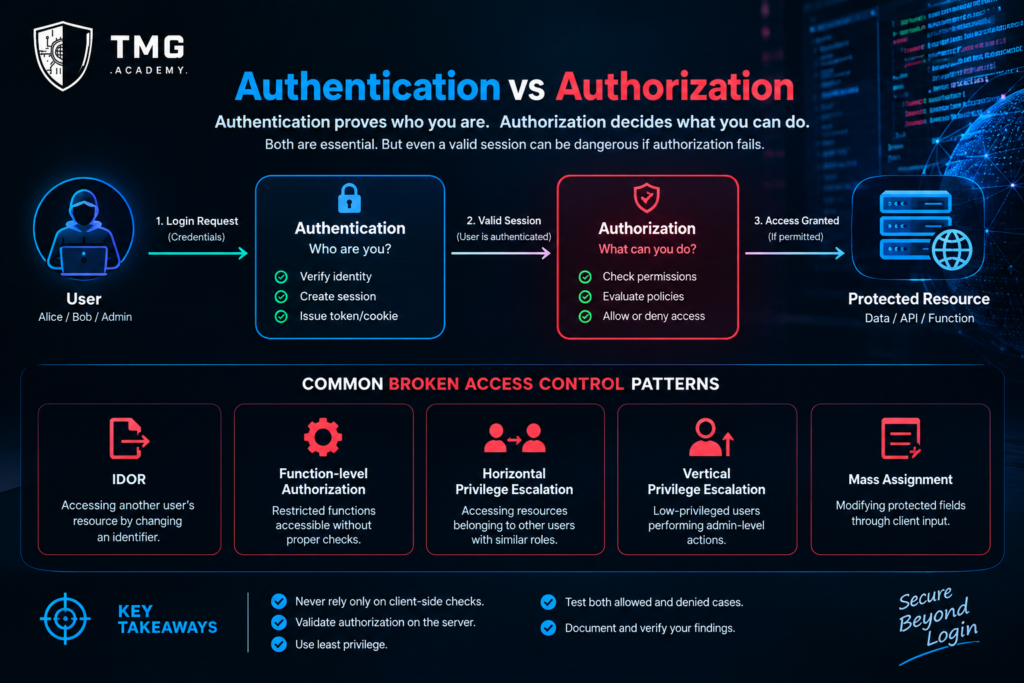
Authentication and authorization are closely related, but they solve different problems.
Authentication: Who is making the request?
Authorization: Is that identity permitted to perform this action on this resource under the current conditions?
Consider a document-management application.
Alice and Bob both have valid accounts. Alice uploads a private document, while Bob uploads a different document.
The application correctly authenticates both users. However, if the backend retrieves a document solely from a client-supplied document identifier without checking ownership or an explicit sharing permission, Bob might be able to access Alice's document by changing the identifier.
The session remains valid. The authentication mechanism has not necessarily failed.
The failure occurs because the application does not enforce the appropriate authorization rule for the requested document.
This distinction matters during penetration testing because an assessor who focuses only on login security can overlook weaknesses that appear after authentication succeeds.
2. The Anatomy of a Broken Access Control Vulnerability
A typical authorization decision involves several elements:
-
Subject: The user, service, or identity making the request.
-
Action: The operation being requested, such as reading, modifying, or deleting a resource.
-
Resource: The specific object or function being accessed.
-
Context: Relevant conditions, such as ownership, organization membership, role, or an explicit sharing relationship.
-
Policy: The rule that determines whether the action is permitted.
A conceptual authorization decision can be expressed as:
Allow = Policy(subject, action, resource, context)
This is a model for reasoning about access control, not a complete implementation.
A weakness can arise when one of these elements is missing or incorrectly evaluated.
For example, an application may check that a user is logged in but never verify that the requested document belongs to that user. Another application may correctly restrict its user interface while allowing a direct API request to invoke a privileged operation.
In both situations, the application relies on an assumption that does not hold at the server's security boundary.
The user interface is not the security boundary
Hiding an administrative button from an ordinary user can improve the interface, but it does not establish authorization.
A user can interact with an endpoint through a browser's developer tools, an HTTP client, or another legitimate interface.
The backend must independently verify every protected operation.
Client-side checks are useful for usability. Server-side authorization is essential for security.
3. IDOR: When Object References Become Access Decisions
Insecure direct object reference, commonly abbreviated as IDOR, is a useful example of broken access control.
An application might expose resources through routes such as:
GET /api/documents/1042
The number identifies a document. The identifier itself is not necessarily a vulnerability.
The security problem occurs if the application retrieves the requested document without checking whether the requesting user has permission to access it.
Changing an identifier should never be sufficient to obtain another user's private data.
It is also important to understand that replacing sequential identifiers with random identifiers is not a complete solution. Unpredictable identifiers may make discovery more difficult, but they do not replace authorization checks.
A secure backend must enforce access policy regardless of whether an identifier is sequential, random, or otherwise difficult to guess.
Why IDOR can be difficult to detect
Not every resource is private to its creator.
Documents may be shared with a team, invoices may be visible to designated finance personnel, and support agents may have approved access to particular customer records.
A penetration tester must therefore establish the intended permission model before deciding whether access is unauthorized.
The right question is not simply whether one user can access another user's object.
It is whether the observed access violates the application's documented or intended authorization policy.
4. A Safe, Authorized Lab Exercise
The following exercise demonstrates how to validate an object-level authorization control using a deliberately vulnerable application or a test application you control.
Use only designated test accounts and non-sensitive data. Do not attempt this against real customer records or systems without explicit authorization.
Lab objective
Determine whether a backend verifies resource ownership or another permitted access relationship before returning a protected document.
Step 1: Establish the intended policy
Create two test accounts, Alice and Bob, in an authorized lab.
Create one private document for each account.
Document the expected rule: Alice can access Alice's private document, and Bob can access Bob's private document. Neither account should access the other's private document unless an explicit sharing permission is granted.
Step 2: Establish the baseline
Sign in as Alice and request Alice's test document using the application's normal interface.
Record the response status, returned content, and relevant application logs.
Repeat the process as Bob for Bob's document.
These requests establish the expected behavior for authorized access.
Step 3: Test the authorization boundary
While authenticated as Bob, request Alice's designated test document through the normal application interface or an authorized HTTP testing tool.
Do not assume that changing an identifier will produce a vulnerability.
Observe the application's actual behavior.
A properly implemented policy should deny access to the private document unless Bob has an explicitly authorized relationship with it.
Step 4: Interpret the evidence
Possible outcomes include:
-
The application denies the request and returns no protected content.
-
The application returns the document despite the absence of permission.
-
The application returns an error but leaks sensitive metadata.
-
The application behaves differently between its web interface and API.
Each outcome requires careful interpretation. A status code alone does not prove that access control is correct; inspect the response body and relevant side effects as well.
Step 5: Document the finding
Record the test accounts, expected policy, request context, observed result, evidence of any unauthorized disclosure, and recommended fix.
Avoid including real personal information in screenshots or reports.
If the application behaves as intended, record that result too. A test that fails to find a vulnerability can still provide useful validation of a specific security control.
5. Beyond IDOR: Four Authorization Failure Patterns
Object-level authorization is only one part of the problem.
5.1 Broken function-level authorization
An application may restrict administrative functions in the interface but fail to enforce the required role or permission on the server.
For example, an ordinary account might be able to invoke a privileged operation that should be restricted to administrators.
The relevant test is whether the backend checks the permission required for that function.
5.2 Horizontal privilege escalation
A user accesses resources belonging to another user with comparable privileges.
This can occur when ownership checks are missing or when resource relationships are incorrectly evaluated.
5.3 Vertical privilege escalation
A lower-privileged user performs an operation reserved for a higher-privileged role.
The weakness may involve missing role checks, incorrect policy inheritance, or inconsistent authorization between endpoints.
5.4 Mass assignment and over-permissive updates
An application accepts client-supplied fields that should not be editable by the current user.
For example, an update operation may allow a user to change a profile field intended to be controlled exclusively by an administrator.
The correct fix is not merely to hide the field in the interface. The server should explicitly define which fields are writable for each operation and enforce the relevant authorization policy.
These patterns may overlap, but distinguishing them helps identify the underlying control failure and select an appropriate remediation.
6. A More Reliable Authorization Testing Framework
I propose a practical framework called the Subject–Action–Resource Matrix.
Its purpose is to make authorization testing systematic rather than dependent on manually changing a few identifiers.
The framework has five steps.
Step 1: Enumerate subjects.
Identify the relevant test identities and their roles, including ordinary users, resource owners, team members, and administrators where applicable.
Step 2: Enumerate actions.
List the protected operations, such as viewing, creating, modifying, deleting, exporting, or administering resources.
Step 3: Enumerate resources.
Identify the resource types and their expected ownership, sharing, and organizational boundaries.
Step 4: Define expected decisions.
For each meaningful subject–action–resource combination, record whether access should be allowed or denied.
Step 5: Validate the actual behavior.
Test representative combinations in an authorized environment, compare the observed result with the expected policy, and document discrepancies.
A simplified matrix might look like this:
<table>
<tbody>
<tr>
<th>Subject</th>
<th>Action</th>
<th>Resource relationship</th>
<th>Expected result</th>
</tr>
<tr>
<td>Alice</td>
<td>Read</td>
<td>Alice's private document</td>
<td>Allow</td>
</tr>
<tr>
<td>Bob</td>
<td>Read</td>
<td>Bob's private document</td>
<td>Allow</td>
</tr>
<tr>
<td>Bob</td>
<td>Read</td>
<td>Alice's private document</td>
<td>Deny</td>
</tr>
<tr>
<td>Alice</td>
<td>Delete</td>
<td>Bob's private document</td>
<td>Deny</td>
</tr>
<tr>
<td>Ordinary user</td>
<td>Change administrative settings</td>
<td>Organization-wide configuration</td>
<td>Deny</td>
</tr>
<tr>
<td>Authorized administrator</td>
<td>Change administrative settings</td>
<td>Organization-wide configuration</td>
<td>Allow, subject to policy</td>
</tr>
</tbody>
</table>
This matrix is illustrative. Real applications may have sharing rules, delegated access, support workflows, and other legitimate exceptions.
The key is to define those exceptions explicitly instead of relying on assumptions.
7. Remediation: Fix the Policy, Not the Identifier
A durable fix addresses the authorization decision itself.
Enforce access checks on the server
Every protected request should be evaluated against the applicable policy before the resource is returned or modified.
Do not rely exclusively on frontend restrictions, hidden buttons, or client-supplied claims about permissions.
Scope resource queries appropriately
Where appropriate, retrieve resources through a query that already incorporates the requesting user's permitted resource scope.
For example, a document service can restrict its lookup to documents available to the authenticated user rather than retrieving an arbitrary document and forgetting to verify access afterward.
The exact implementation depends on the application's authorization model and data architecture.
Apply least privilege
Users and services should receive only the permissions necessary for their assigned responsibilities.
Avoid broad administrative privileges where narrower permissions are sufficient.
Deny by default
Protected operations should be denied unless the applicable authorization policy explicitly permits them.
This requires careful handling of exceptions, service accounts, and legitimate delegated access.
Centralize policy where practical
Reusable authorization components can reduce inconsistencies between endpoints.
However, centralization alone does not guarantee correctness. The policy must still evaluate the correct subject, action, resource, and context.
Test authorization continuously
Include authorization tests in automated testing and deployment workflows.
For important operations, test both permitted and forbidden cases. Verify that unauthorized requests cannot read protected data, modify records, or trigger privileged side effects.
Regression tests should preserve these security expectations when application features change.
8. Measuring Authorization Security
A security program should measure whether its authorization policies are consistently enforced.
Useful measures include:
Authorization test coverage: The proportion of defined security-critical subject–action–resource combinations covered by tests.
Negative-test success rate: The proportion of test cases that correctly deny unauthorized operations.
Regression recurrence: The frequency with which previously corrected authorization weaknesses reappear.
Cross-layer consistency: Whether equivalent web and API operations enforce the same intended policy.
Remediation verification: Whether a reported authorization weakness is demonstrably fixed through retesting.
These metrics need clearly defined test scopes. A high coverage percentage does not prove that every possible access-control failure has been eliminated.
The purpose is to expose untested permission boundaries, identify regressions, and prioritize security improvements.
9. What Professional Penetration Testers Should Report
A useful access-control finding should allow developers to understand the violated security rule and reproduce the behavior safely.
A strong report includes:
<ol start="1">
A concise title identifying the authorization weakness.
The affected application component or endpoint.
The expected permission rule.
The controlled test identities and resources used.
The observed behavior and supporting evidence.
The demonstrated impact, separated from hypothetical consequences.
A remediation recommendation.
A retest procedure that verifies the fix.
</ol>
Severity should reflect the actual impact, affected resources, required privileges, and relevant environmental context.
An authorization flaw that exposes one low-sensitivity test record should not automatically receive the same severity as a flaw that permits broad access to sensitive organizational data.
Accurate reporting is part of ethical hacking. It prevents both underestimation and exaggeration of security risk.
Conclusion: Trust Must Be Verified at Every Resource Boundary
A valid session proves that an application has authenticated an identity. It does not prove that every subsequent request is legitimate.
Broken access control occurs when applications fail to enforce the permissions that should govern access to individual resources and operations.
For penetration testers, the solution is a disciplined assessment process: establish the intended policy, identify the relevant identities and resources, test allowed and denied operations, collect reproducible evidence, and verify remediation.
For developers, the responsibility is equally clear: enforce authorization on the server, apply least privilege, define resource relationships explicitly, and test both positive and negative access cases.
The most important lesson is simple:
Do not ask only whether the user is authenticated. Ask whether this user, performing this action, on this resource, under these conditions, should be allowed to proceed.
That is the difference between an application that recognizes its users and an application that actually protects their data.
References and Further Reading
<ol start="1">
OWASP Top 10 — Broken Access Control: https://owasp.org/Top10/A01_2021-Broken_Access_Control/
OWASP Web Security Testing Guide: https://owasp.org/www-project-web-security-testing-guide/
OWASP API Security Top 10: https://owasp.org/www-project-api-security/
OWASP Authorization Cheat Sheet: https://cheatsheetseries.owasp.org/cheatsheets/Authorization_Cheat_Sheet.html
</ol>
Author's note: The lab exercise is intended for a deliberately vulnerable application or an explicitly authorized test environment. The Subject–Action–Resource Matrix is a proposed practical testing framework, not an official OWASP standard.
 🎓 Want to go deeper?WAPT (Web Application Penetration Testing)Hands-on course by TMG Security →
More from the TMG Security blog

Community posts reflect the author's own experience. Only test systems you have permission to test.
