
A mobile application can pass basic security checks while still exposing sensitive data through insecure local storage, weak API authorization, exported Android components, and misplaced trust in the client. This article presents a practical, evidence-driven framework for authorized mobile applicati
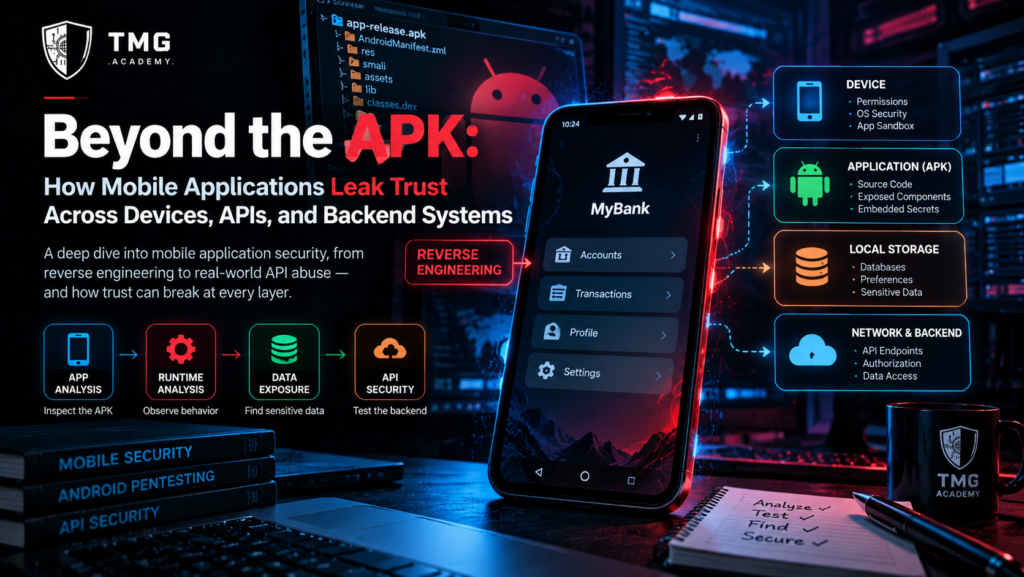
<h1>Beyond the APK: How Mobile Applications Leak Trust Across Devices, APIs, and Backend Systems</h1>
Category: Mobile Application Security
Focus: Android Security, Mobile Pentesting, API Security, Secure Storage, OWASP MAS
Introduction: The APK Is Only Half the Attack Surface
A mobile application can look secure during installation, pass basic static analysis, and use encrypted network connections while still exposing sensitive information or allowing unauthorized operations.
Why?
Because a mobile application is not an isolated security boundary.
It is a distributed system involving a device, an application package, an operating system, local storage, network communications, identity services, APIs, and backend infrastructure. Security weaknesses can emerge at the boundaries between these components, especially when one component trusts another without independently enforcing the required security policy.
Consider a banking-style application in an authorized test environment. The application requires authentication, communicates with its backend over HTTPS, and hides administrative functions from ordinary users.
Those protections are useful, but they do not answer every important security question.
Does the backend independently verify access to each account? Does the application store sensitive information unnecessarily? Can another application invoke a component that was intended to remain private? Does the server trust a permission value supplied by the client?
Each question concerns a different security boundary.
The central principle of mobile application security is that the device can be part of the security system without being the ultimate authority for sensitive decisions.
This article develops a practical framework for evaluating those boundaries during authorized mobile application assessments.
1. Understand the Four Mobile Security Boundaries
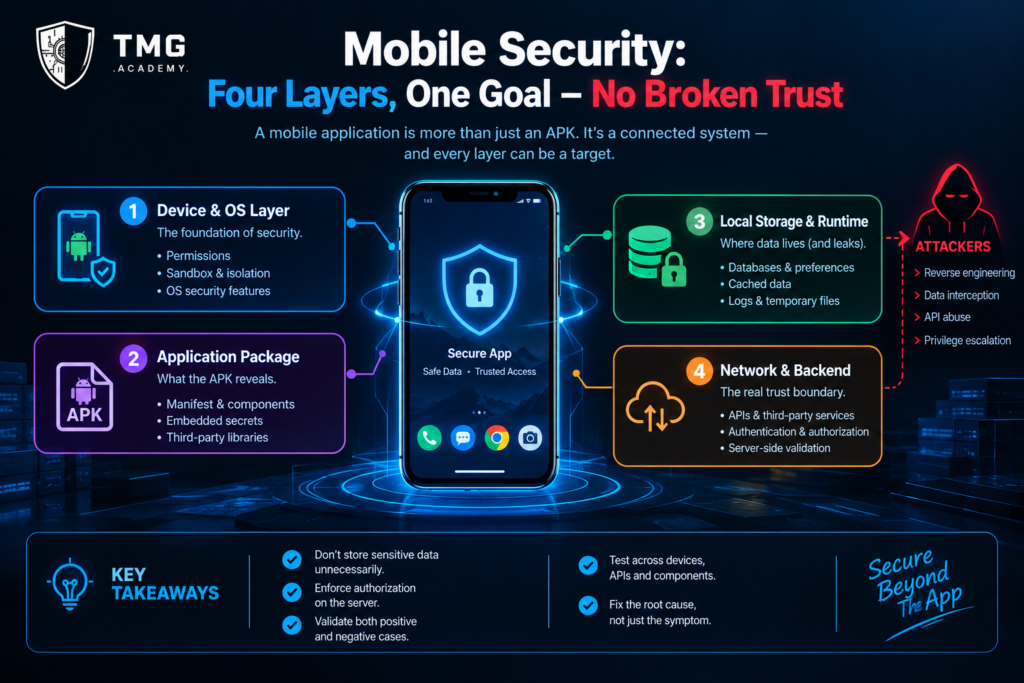
A useful mobile security assessment begins by separating the application into four connected layers.
Layer 1: The device and operating system
This layer includes Android or iOS security controls, application sandboxing, device permissions, process isolation, and operating-system APIs.
A tester should examine whether the application uses platform security features correctly and whether its behavior changes under relevant device configurations.
The objective is not to assume that the operating system has failed, but to determine which protections the application relies upon and whether those assumptions are appropriate.
Layer 2: The application package
This layer contains the application's code, resources, configuration, embedded libraries, and declared components.
For Android, the APK can reveal information about exported activities, services, broadcast receivers, content providers, permissions, network security configuration, and potentially sensitive values included in the package.
An APK should be treated as an inspectable software artifact, not as a place to hide secrets.
Obfuscation may make reverse engineering more difficult, but it does not provide reliable confidentiality for credentials or long-lived private keys embedded in client code.
Layer 3: Local storage and runtime behavior
Applications frequently maintain preferences, cached responses, temporary files, databases, logs, and session-related information.
The security question is whether sensitive information is stored, exposed, or retained beyond what the application requires.
Testing should consider the data's sensitivity, the storage mechanism, the device's threat model, and whether the information remains accessible after logout or account changes.
Layer 4: Network and backend services
A mobile application may rely on authentication providers, REST APIs, GraphQL endpoints, cloud services, and third-party SDKs.
The backend must enforce authorization independently of the mobile interface.
A client-side restriction does not prevent a user from issuing a request through another legitimate HTTP client. Likewise, encrypting a network connection protects data in transit but does not prove that the server authorizes the request correctly.
These four layers should be evaluated together. A weakness in one layer can undermine protections provided by another.
2. Static Analysis: Read the Application Before Running It
Static analysis examines an application package without requiring the application to execute.
For Android assessments, the manifest and decompiled resources can provide an initial view of the application's security configuration.
Useful areas to review include:
-
Exported activities, services, broadcast receivers, and content providers.
-
Declared permissions and component-level access restrictions.
-
Network security configuration and cleartext traffic settings.
-
Embedded API endpoints and configuration values.
-
Outdated or vulnerable third-party dependencies.
-
Logging statements and potential exposure of sensitive information.
-
Cryptographic implementation choices and insecure fallback behavior.
Tools such as JADX, Apktool, and MobSF can assist with authorized analysis. Their findings require human verification because automated scanners may report false positives or miss context-dependent vulnerabilities.
Why configuration matters
An Android component that is accessible to other applications can create an unintended entry point if it exposes sensitive functionality without suitable permission checks.
However, an exported component is not automatically vulnerable. Its intent, permission requirements, input validation, and actual behavior must be evaluated.
The same principle applies to embedded endpoints and configuration values. A public API base URL is generally not a secret, while an embedded private credential may represent a serious security issue.
The assessment should distinguish ordinary application metadata from information that actually grants unauthorized access.
3. Dynamic Analysis: Observe What the Application Really Does
Static analysis reveals what the package appears to contain. Dynamic analysis examines behavior while the application runs in a controlled environment.
An authorized assessment can examine:
-
The requests generated during normal application workflows.
-
The information sent to backend services.
-
The handling of authentication tokens and session expiration.
-
The behavior of logout and account switching.
-
The permissions requested at runtime.
-
The handling of invalid or unexpected server responses.
-
The interaction between the application and other operating-system components.
A useful starting point is to create a baseline using a designated test account and non-sensitive test data.
Record the normal behavior for login, reading a permitted resource, updating a profile, and logging out.
Then compare the observed behavior with the application's intended security policy.
If a request contains an account identifier or role value, do not automatically assume that it creates a vulnerability. Determine whether the backend validates the relevant identity and permissions before performing the requested operation.
The objective is to establish what the application and server actually enforce, not merely what the interface displays.
4. The Backend Trust Problem
One of the most consequential mobile security mistakes is treating the application as a trusted authority.
Suppose a mobile client displays only the records belonging to the currently signed-in user.
That interface may be implemented correctly, but the backend must still verify that each requested record is accessible to that user.
If the server retrieves a resource solely from a client-supplied identifier without enforcing ownership or another valid authorization relationship, the application may expose data across account boundaries.
This is an instance of broken object-level authorization, a risk addressed in the OWASP API Security Top 10.
The same principle applies to privileged operations.
A client must not be able to grant itself administrator permissions merely by modifying a local value or sending an altered request. The server must derive or validate privileges through a trusted authorization mechanism.
The practical testing question
For each sensitive API operation, ask:
<ol start="1">
Which identity is authenticated?
Which resource is being requested?
What policy determines whether access is allowed?
Does the backend enforce that policy independently?
What happens when the request violates the policy?
</ol>
The answers should be supported by observable evidence.
A mobile application can have excellent local security and still be vulnerable if its backend authorization model is incorrect.
5. Local Data Exposure: When Convenience Becomes Risk
Mobile applications often cache information to improve performance and support offline functionality.
Caching is not inherently insecure. The risk depends on what is stored, where it is stored, who can access it, and how long it remains available.
Sensitive data may appear in:
-
Application databases and preference files.
-
Cached API responses.
-
Temporary files and downloaded documents.
-
Diagnostic logs.
-
Clipboard contents.
-
Notifications or screenshots.
-
Backups, depending on platform configuration and policy.
A professional assessment should begin by identifying the application's sensitive data flows.
For each data type, document its source, intended destination, local storage requirements, retention period, and deletion behavior.
Then validate whether the actual implementation follows that policy.
A safer design approach
Applications should minimize the amount of sensitive information stored locally.
When persistent secrets are necessary, use appropriate platform-backed storage mechanisms, such as Android Keystore for cryptographic key management, rather than treating ordinary application preferences as a secure vault.
Use encryption where it meaningfully protects the data, but remember that encryption alone does not solve every exposure problem. If an application can decrypt sensitive data automatically while running, the threat model must account for what an attacker with access to that running application might be able to observe.
Logout behavior also matters. Removing a visible session indicator is not equivalent to securely clearing sensitive cached data or invalidating a server-side session where required.
6. Android Component Security: The Hidden Entry Points
Android applications can expose functionality through activities, services, broadcast receivers, and content providers.
These components support legitimate interoperability, but their security depends on correct configuration and access enforcement.
During an authorized assessment, examine:
-
Whether components need to be externally accessible.
-
Whether exported components require suitable permissions.
-
Whether incoming intents and data are validated.
-
Whether content providers restrict access to the intended data.
-
Whether deep links validate their parameters and destination.
-
Whether sensitive operations require an appropriate authenticated and authorized context.
An exported activity that displays public information may be entirely legitimate. An exported component that performs a sensitive action without validating the caller's authorization may not be.
The distinction comes from the security policy and the component's actual behavior, not from a configuration flag in isolation.
For modern Android applications, manifest settings must also be interpreted in the context of the target SDK and platform version.
A scanner can identify suspicious configurations, but the assessor must determine whether they are reachable and exploitable under the applicable conditions.
7. A Practical Mobile Security Lab
The following exercise can be performed against a deliberately vulnerable Android application or an application you own and are authorized to test.
Objective
Determine whether a mobile application and its backend enforce the intended access policy consistently.
Step 1: Define the test environment
Use an emulator or designated test device, a test application, two test accounts, and non-sensitive sample records.
Document the application version, operating-system version, backend environment, and test scope.
Step 2: Establish the expected behavior
Sign in using the first test account and perform a normal, permitted operation.
Record the relevant request and response, taking care not to capture real credentials or unnecessary sensitive information.
Repeat the workflow with the second test account.
Step 3: Inspect the application package
Review the manifest, component exposure, network configuration, storage-related implementation, and embedded configuration values.
Treat each finding as a hypothesis requiring validation.
Step 4: Examine the API authorization boundary
Identify a resource or operation for which the two test accounts have different permissions.
Using only the designated test data, verify whether the backend enforces the expected policy when requests are made through the application and an approved testing client.
The expected outcome should be defined before testing.
Step 5: Review local data handling
Inspect the application's designated test environment to determine which records are stored locally, whether sensitive values are protected appropriately, and what remains after logout.
Do not extract unrelated information from a personal or third-party device.
Step 6: Document the result
For every finding, record:
-
The expected security behavior.
-
The actual behavior.
-
The evidence supporting the observation.
-
The impact demonstrated by the test.
-
The relevant limitations.
-
The recommended remediation.
-
The procedure for verifying the fix.
A test that finds no weakness can still produce valuable evidence about the specific controls evaluated.
8. Build a Mobile Security Evidence Matrix
To make assessments more systematic, I propose a Mobile Security Evidence Matrix.
This is a practical assessment framework, not an official industry standard.
It connects each test area to a security property and the evidence needed to evaluate it.
<table>
<tbody>
<tr>
<th>Test area</th>
<th>Security property</th>
<th>Evidence to collect</th>
</tr>
<tr>
<td>Authentication</td>
<td>Identity is established correctly</td>
<td>Controlled login and session behavior</td>
</tr>
<tr>
<td>API authorization</td>
<td>Users can access only permitted resources</td>
<td>Test-account requests and server-side outcomes</td>
</tr>
<tr>
<td>Local storage</td>
<td>Sensitive data is handled appropriately</td>
<td>Storage inventory and data-handling observations</td>
</tr>
<tr>
<td>Android components</td>
<td>Exposed functionality is properly restricted</td>
<td>Manifest review and authorized component tests</td>
</tr>
<tr>
<td>Network security</td>
<td>Communications follow the intended security policy</td>
<td>Configuration review and controlled traffic observations</td>
</tr>
<tr>
<td>Session management</td>
<td>Session lifecycle is handled correctly</td>
<td>Expiration, logout, and account-switching results</td>
</tr>
<tr>
<td>Remediation</td>
<td>Identified weaknesses are corrected</td>
<td>Repeatable before-and-after test results</td>
</tr>
</tbody>
</table>
The matrix prevents the assessment from becoming a collection of unrelated scanner findings.
It also makes coverage gaps easier to identify. If a test area has no defined security property or supporting evidence, the team should determine whether the area is out of scope or simply has not been evaluated.
9. Remediation Priorities for Developers
The most effective fixes address the underlying security boundary rather than hiding the symptoms.
Enforce authorization on the server. Validate access to every sensitive resource and operation.
Minimize local sensitive data. Store only what the application genuinely requires and define appropriate retention and deletion behavior.
Protect cryptographic material. Use suitable platform mechanisms and avoid embedding private credentials in the application package.
Review component exposure. Restrict exported functionality and validate incoming data and caller permissions.
Use secure network configurations. Apply appropriate transport security and avoid insecure fallback configurations.
Manage sessions deliberately. Define token expiration, revocation, logout behavior, and account-switching requirements.
Automate security regression tests. Test both allowed and denied operations so that later development changes do not silently weaken access controls.
Verify fixes independently. A code change is not proof that the vulnerability is resolved. Repeat the test and confirm that the expected security property now holds.
10. What Makes a Mobile Pentest Report Professional?
A high-quality report should separate verified facts from assumptions.
For each finding, include a concise title, affected component, prerequisites, reproducible test conditions, supporting evidence, demonstrated impact, remediation guidance, and retest criteria.
Avoid claiming that a mobile application is fully compromised when the evidence establishes only a limited configuration issue.
Likewise, avoid declaring an application secure simply because a scanner found no high-severity vulnerabilities.
The scope of the conclusion should match the scope of the test.
Professional mobile security testing is not about generating the largest possible list of findings. It is about identifying meaningful weaknesses, demonstrating them safely, and giving developers enough information to correct and verify them.
Conclusion: Secure the Relationships, Not Just the Application
Mobile application security is often approached as a checklist of individual controls: enable encryption, inspect the APK, review permissions, and test API endpoints.
These practices matter, but their value increases when they are connected through a coherent security model.
The device, application package, local storage, and backend each have different responsibilities. Security failures often emerge when one layer assumes that another has already enforced a rule.
A mobile client should not be the final authority for backend permissions. An exported component should not be assumed safe simply because the application requires login elsewhere. Encrypted storage should not justify collecting unnecessary sensitive information.
A mature assessment evaluates the boundaries between these components and supports each conclusion with evidence.
The Mobile Security Evidence Matrix provides one way to organize that work: define the security property, identify the relevant boundary, test the expected behavior, document the result, and verify remediation.
The strongest mobile security posture is not achieved by making the APK difficult to inspect. It is achieved by ensuring that sensitive data and operations remain protected even when the client is examined, modified, or used in unexpected ways.
References and Further Reading
<ol start="1">
OWASP Mobile Application Security (MAS): https://mas.owasp.org/
OWASP Mobile Application Security Testing Guide (MASTG): https://mas.owasp.org/MASTG/
OWASP Mobile Application Security Verification Standard (MASVS): https://mas.owasp.org/MASVS/
OWASP API Security Top 10: https://owasp.org/www-project-api-security/
Android Developers — Security Best Practices: https://developer.android.com/privacy-and-security/security-best-practices
</ol>
Author's note: The Mobile Security Evidence Matrix is a proposed practical framework, not an official OWASP standard. The lab exercise is intended for applications and environments that the tester owns or has explicit permission to assess. Any experimental findings should reflect tests actually performed.
 🎓 Want to go deeper?Android Penetration TestingHands-on course by TMG Security →
More from the TMG Security blog


Community posts reflect the author's own experience. Only test systems you have permission to test.
